Learning to create a bulleted and numbered list FA7

| 0 komentar |
Today I am going to show you how you can use Word to create a bulleted list and a numbered list.  Usually, a numbered list is created to show rank (such as your favorite athlete, second favorite athlete, and so on) while a bulleted list is used to show a list that has no rank (a shopping list would be an example).  These are fairly easy to create, modify, and format so Ill show you how you can do that today before starting on your next Formatting Activity.

Again, I want to remind those of you who have vocabulary words to define to get those completed as soon as you can.  If you want to come in here before school or during lunch recess to do that you are welcome - just let me know.


Activity 7.pdf

Read More..

Motivate

| 0 komentar |
We have been having a serious motivation issue in the CS Principles class this marking period. While they are in the room everything gets done, but once they are out the door...it is like homework causes a rash - avoid at all costs. Traditionally grades plummet the marking period after exams, but this is getting ridiculous.

So I have been working on some ways to motivate/nag and see if things improve.

Last Friday before we did the chalk algorithms I had them all text one fact about methods to my e-mail address. This is a sneaky way to capture their text numbers so I can send out reminders.

I am also going to try these:
[Source]
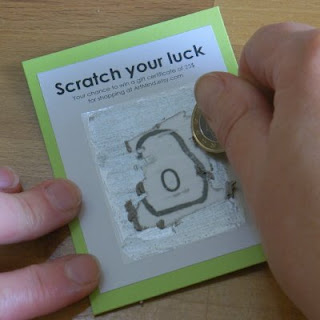
 This tutorial shows you how to make scratch cards, similar to lottery tickets. My thinking is they can get one of these for doing 5 homeworks in a row.

The hard part is coming up with prizes. I am thinking of doing some gift certificates to the book store - candy sells anything. I never do extra credit, but I might make a few to let them roll a die for bonus points. Ill have to search Oriental trading Co for more ideas. They need to be worth working for, but also not break the bank...
Read More..

Computer Science and The Digital Native Myth

| 0 komentar |
From the Washington Post this morning: Survey finds gap in Internet access between rich, poor students
So the basic summary - half of students from upper income families have Internet access at home, only 3% of students from poor families have Internet access.


No surprise there. I have students that do not have electricity or running water at home. Food is an issue. It is hard to imagine that Internet is a possibility.

So what does that mean for us in Computer Science education?

As educators we have to challenge the assumptions about digital natives with the push for 21st century learning. Weve have several readings in our professional development recently about digital natives and how they are different from us "digital immigrant" educators.

All true, as far as it goes. Some of my students have had access to technological devices since they were toddlers. They are comfortable with using technology to solve problems. They live in a world with constant access to humanitys  largest storehouse of information. They have never lacked for a fact or access to information. They also do not naturally question a lot of the information they receive.

But that is only some of my students. A real wall has grown over the past five years between the students with access and without.

And that is not to say that project based learning is only good for some students. It is a natural way to teach in computer science classes. I have been doing some version of it since the mid 90s when I started teaching computer science. It has been sort of funny that it now has a name.

But what other assumptions about digital natives are we carrying into our classrooms? As technology has shifted from something we visit to something embedded in the lives of many of our students it is too easy to assume every student in instantly comfortable in our labs.

The access issue needs to inform everything from how we recruit to the examples we use in class. I know I am guilty of using smart phones often as an example of something in the "real world". A real world that only exists for a section of my students. It is probably about like trying to explain English grammar by comparing it to Japanese.

And the question then becomes, is computer science really for everyone?

I say yes, and it is something we may need to fight for. It is easy to attract the kids with access. Really, how hard is it to convince a kid that spent last summer at  robotics camp that computer science might be interesting?

For the rest of the kids computer science classes are the one chance they have of really climbing over that wall. We offer an Ellis Island opportunity for the "digital immigrants" in our classes.

So do we do the easy thing, or the right thing?

Of course I am crazy enough to think that computer science should replace the traditional geometry class for all students. But we can debate that one another day.


Read More..

wav video FA9

| 0 komentar |
Here is a video that explains what a WAV video is:


After watching the video we will be working to complete FA9.  I am going to show you what you can do with the drawing shapes in Word as well as how to use and format WordArt. Activity 9.pdf

Read More..

Improve Speed Of Computer With These Long Term Strategies

| 0 komentar |

If you have a day or 2, I highly recommend you to apply these strategies. Unlike other techniques, it might take 1 or 2 days to improve speed of computer. However, these strategies work better than shortcuts that work temporarily.

Step 1: Remove unused programs and files

A computer is like a library. The more books you have in a library, the harder it is to find the book that you want. When you have lots of files and programs installed in your PC, it will take time to find and load as well. By removing programs and files that you don’t use, your computer will run much faster.

To remove programs, you can use the following steps:

Click on “Start” menu
Choose “Settings”
Choose “Control Panel”
Choose “Add or Remove Programs”
Select Programs that you are not using anymore and uninstall or remove it.

To remove the files, just right click the file and delete. After deleting those files, make sure you empty your recycle bin by right clicking on “Recycle Bin” and choose “Empty Recycle Bin”.


Step 2: Move files to external drives

Move seldom or common used files to External Hard Disk or USB Flash Drives. This is also another step to reduce the “books” in your “library”. These tools are getting cheaper nowadays and very affordable. I highly recommend external hard disk because it has more space and not easy to lose it (people around the world are losing more than 1 million of USB flash drives almost every year).

Moving them is quite simple. Just select, cut and paste it on your external hard disk.

Step 3: Cleaning up your desktop

If you are just like me, you probably have tons of files, program shortcuts and folders on your desktop. It is very convenient and I totally understand it. But having lots of stuffs on your desktop will slow down your computer’s performance.

Cleaning up your desktop make require some planning. Create a folder on your desktop and name it as “Work” or “Studies”. You can create 2 or 3 more folders. Next, create more folders in those folders to organize all your files and programs. Keep a habit to organize your files into these folders.

Step 4: Detect errors and repair

If you have been using your computer for months, your hard drive might start to develop errors and bad sectors. These errors will slow down your computer. Fix this errors once a week by following these steps:

Click on “My Computer”
Right click the drive you use (normally Drive C)
Click on “Properties”
Click on the “Tools” tab
Click “Check Now” button
Check the box that says “Scan for and attempt recovery of bad sectors”
Fix if bad sectors are discovered.

Step 5: Defragment

This is a popular way to improve speed of computer. The steps to defragment are quite simple. Start with clicking on the “Start” menu, choose “All programs”, “Accessories”, “System Tools” and “Disk Defragment”. Click on “Analyze”. Once your computer finish analyzing, click on “Defragment”.

Step 6: Clear hidden Windows errors 

About 90% of SLOW computers are cause by hidden Windows error. Cleaning these errors would be hard if done manually. Fortunately, There’re programs such as PC Speed Doctor to do it for you automatically.

Step 7: Overclocking

Overclocking is a way to hack your own hardware and increase their speed. Overclocking is quite technical too. If you are interested in this step, I highly recommend you to learn from Overclock Your CPU. The author teaches how you can increase processors from 1.9GHz to 3.5Ghz.

Other websites:
  • Computer Fundamentals
  • web design toronto
  • Motorola Surfboard
  • nikon digital cameras
Read More..

Vocab quiz 3 Caps Lock key Question Mark key and Tab key

| 0 komentar |
Today we will review at the beginning of the hour for vocab quiz #3.

After the quiz, if you did not finish yesterdays assignment you need to complete it and send it to me.

If you are done with both please open Microsoft Word and turn to page 17.  Youll need to type lines 1-3 on 8B using the Caps Lock key (L4) once; after you complete those lines you need to complete lines 4-6 once on 8B - here you will learn the question mark key (Left Shift + R4).

Once you have completed the above lines go to 8C and complete each of those lines once.  In this section you will learn to use the TAB key (L4) - a TAB allows you to move your cursor to a preset position on the line of writing.  For you, as you will see when you type these lines, the preset position is 1/2" from the left margin.

After completing all of these lines raise your hand and I will come and check your work.  Then you may go to any of the practice sites listed on the Website Resources page of the blog.  Make sure to work with your speed skin on your keyboard for the entire hour!
Read More..

Posters for Computer Science Careers that use Computer Science

| 0 komentar |
These posters are from the Otronicon Science Center in Orlando, FL. Forget Harry Potter World, we are definitely putting that on the list for our next Florida trip. I am sure this kids wont mind.

Anyhoo, I am fascinated that a science museum has done such a thorough job of including computational thinking and computer science topics in their materials.


Anyway, the posters are free to print and use. They include writing, architecture, linguistics - some fields we dont traditionally associate with computer science.

Some of the other pages have some good resources too. The Medical Sim City page (tagged: See how simulation technology is being used to create better doctors, nurses and other medical professionals) looks like it has some interesting things to help cover the modeling and simulation info in the APCS Principles course, for example.
Read More..